
































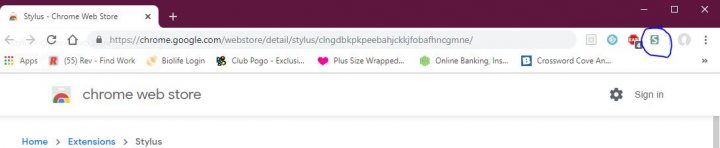
Install the Stylus app for Google Chrome. It can be found here
https://chrome.google.com/webstore/detail/stylus/clngdbkpkpeebahjckkjfobafhncgmne/
First go to https://www.marapets.com/online.php
Click on the S up next in the top right
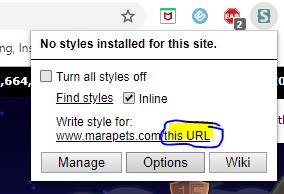
click add style for: this URL
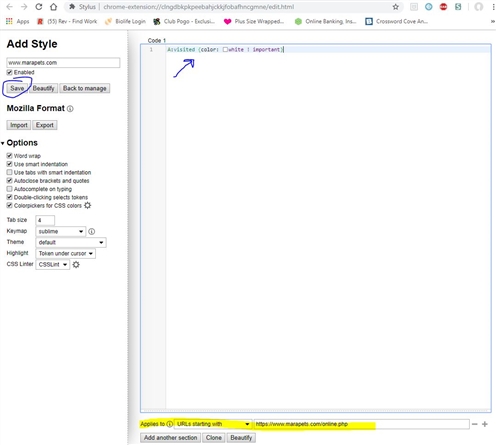
in the code box type in A:visited {color: white ! important}
You don't have to use white, you can use whatever color you want. I prefer white myself is all.
At the bottom of the box make sure it says Applies to URLs starting with (that's a drop box) and in the box next to that https://www.marapets.com/online.php
DO NOT FORGET to clear your history every day so that the colors will reset to black and you will know who you haven't visited that day.
https://chrome.google.com/webstore/detail/stylus/clngdbkpkpeebahjckkjfobafhncgmne/
First go to https://www.marapets.com/online.php
Click on the S up next in the top right
click add style for: this URL
in the code box type in A:visited {color: white ! important}
You don't have to use white, you can use whatever color you want. I prefer white myself is all.
At the bottom of the box make sure it says Applies to URLs starting with (that's a drop box) and in the box next to that https://www.marapets.com/online.php
DO NOT FORGET to clear your history every day so that the colors will reset to black and you will know who you haven't visited that day.

 75 Susanna


 Clubs
Clubs Editorial
 Forums
 Mail
Mail MaraTalk
 Notice Board
 Pages
Pages Players Online
 Referral System
 Sewer Fairy
 Spam Fairy